Welcome to Viewsion. We are suppliers of Google SketchUp Training and a Technical Consultancy.
We can show you how to get all kinds of solutions from this extraordinary software!
Google SketchUp
Viewsion was founded in 2008 by Alan O'Brien (IT Consultant) and Paul Lee (Architect) to facilitate training for Google SketchUp in Ireland, a first for the country. We have already trained people from multiple disciplines including the following: Film Set Designers, Architects, Landscapers, Engineers, Students etc... we look forward to helping you in the future...
What we do:
Google SketchUp Essentials 1 course. €225 - Course Duration: 1 Day
This Course is specifically designed to deliver a well rounded conceptual framework for anyone wanting to discover the power of the most exciting 3D modelling tool on the market today! Whether you are new to SketchUp, or whether you already consider yourself an experienced SketchUp user this course offers the fundamental knowledge and skills which are essential to have you modelling your latest project in no time.
Know before you go: You should be comfortable with the material in the following video tutorials available on the Google SketchUp Website:
1. Using the Mouse,
2. Basics of SketchUp.
Completing the tutorials should only take about 15 minutes
Student/Unemployed Rate
Purchase this Course
Google SketchUp Essentials 2 Course. €149 - Course Duration: Half Day (normally run with Geomodelling Course)
This course will build upon the basic fundamentals skills learned in the Essentials 1 course while expounding upon topics such as the difference between groups and components. The use of organizational methods that utilize the component browser, outliner , and layer control functions of SketchUp. This course will also demonstrate modelling techniques that will expand your ability to model more complex projects while increasing speed, accuracy, and efficiency. It is highly recommended that students complete the Essentials 1 course prior to taking Essentials 2.
Know before you go: You should be comfortable with the material in the following video tutorials available on the Google SketchUp web site:
1. User Interface Overview,
2. Basic Geometry in SketchUp,
3. The Offset Tool, and
4. Multi-Copy.
Completing the tutorials should only take about 15 minutes.
Special Offer, Get Essentials 2 and Geo-Modelling now for €225 (normally €298)
Get It Now!
SketchUp AEC (Architecture, Engineering, Construction) €325 - Course Duration: 1 Day
Course Descriptor
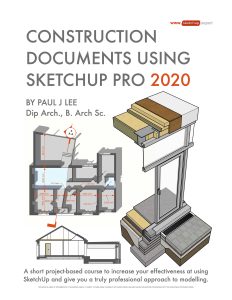
This course is specifically designed for professionals who wish to get up and running in an office environment so that they can immediately start using the immense power of SketchUp Pro to deliver lightning fast information for planning, tender, and construction phases. This course has been designed by Paul Lee, Dip. Arch., B. Arch. Sc., ARIAI, who uses SketchUp as an architect in his own practise (www.aspirearchitecture.com), and has devised methods of use that are uniquely powerful and efficient. Paul has researched CAD standards for a number of years and has devised CAD tutorials to give candidates the benefit of years of his own experience in CAD drawing offices. Now this knowledge has been transferred to this unique SketchUp course that you cannot get anywhere else in the world.
This course covers the following areas among others:
"Vital things you may have missed when you were teaching yourself SketchUp"
Using Groups, Components Layers and Outliner to access the 3d model efficiently
Working with CAD: Import/ Export/ Do you need to use CAD so much?
Using Layout's graphic overlays to provide exceptional 2d and 3d information in conjunction with interactive SketchUp drawings
Viewsion's 2d workflow: Using SketchUp to provide detailed 2d construction information
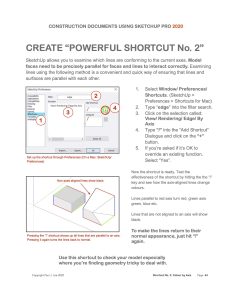
SketchUp power tips and tricks for the professional
Proper nomenclature and use of Layers for the professional
Introduction to Dynamic Components (SketchUp 8)
Advanced SketchUp Course. €225 - Course Duration: 1 Day
This course introduces advanced modelling techniques, layer management, section tools, the import/export of CAD files, and landscape modelling techniques. You will gain the confidence and the know-how to try just about anything in SketchUp AND GET IT DONE! Due to the rigorous pace of the course and the complexity of the information that is covered - It is highly recommended that students take the Essentials 1 and Essentials 2 courses prior to enrolling in the Advanced Skills course
Google Geo-Modelling Class (course design by Google) €149 - Course Duration: Half Day (normally run with Essentials 2 Course)
The Mastering 3D Using SketchUp: Geomodeling Training course provides students with a comprehensive
overview of the process and benefits of exploring the interoperability of SketchUp and Google Earth, and a deeper
look into the Google 3D Warehouse.
Google Advanced landscape (course design by Google) €225 - Course Duration: 1 Day
Visualizing and communicating spaces in three dimensions is critical to the success of the design of architectural
spaces. The interplay of light, color, space and form make exciting spaces function successfully. Traditional
methods for exploring these issues are very labor intensive. Use of computer software has enabled quicker (and
sometimes more accurate) study models to be generated and explored.
Successful integration of modeling software within a design-related practice hinges on how well the computer
information can be used, not only inside the computer (to other software packages), but also outside the computer
to communicate to clients and review agencies. The output from your SketchUp computer models may be
rendered in many different ways; from straight computer printouts using Styles, to raster images for retouching
with photo editing software, to vector polygon graphics reworked with illustration software, to producing accurate
perspective underlays for developing hand renderings.
Google LayOut 3 (course design by Google) €225 - Course Duration: 1 Day
The LayOut 3 course will cover the fundamental principles of LayOut as a 2D drafting and presentation tool.
The LayOut 3 course ultimately provides you with the strategies and techniques you need to effectively and efficiently present your 3D SketchUp models in digital and print formats.
Calling all Students and Unemployed persons, Did you know that we offer discounted rates for our courses. Up to 50% off on some courses.
(note: to avail of discounted rate proof of college attendance / recent social welfare receipt must be provided)
Architecture & Product Design
Architects use SketchUp Pro at every stage of the building design process. From simple massing studies to highly-detailed models, SketchUp Pro is a simple but powerful tool for exploring and presenting your ideas in 3D.
Construction
Construction companies use SketchUp Pro to quickly and effectively communicate 3D information to all project teams, enhancing collaboration and ensuring a shared vision.
Engineering
Engineering firms use Google SketchUp Pro to quickly and effectively communicate 3D ideas and information, enhancing collaboration, reducing inefficiencies and solving design problems.
Product Design
Need help visualising your design in 3D, give us your design and we will do all the hard work for you.
Interior Design
Interior Designers use SketchUp Pro because it's efficient and user-friendly. From small residential projects to major public spaces, SketchUp Pro is a simple but powerful tool for exploring and presenting your ideas in 3D.
Landscape Design
Landscape architects use SketchUp Pro on all kinds of projects. From residences to large-scale urban parks, SketchUp Pro is a simple but powerful tool for exploring and presenting your ideas in 3D.
Environmental Graphic Design (Signposts, Street Markings etc...)
Environmental graphic designers use SketchUp Pro because it's quick, efficient and easy to use. From signage and way finding systems to display and exhibit design, SketchUp Pro is a simple but powerful tool for exploring and presenting your ideas in 3D.
Urban Planning
Planners and urban designers use SketchUp Pro because it's fast and intuitive to use. From simple massing studies to fully-articulated buildings and outdoor spaces, SketchUp Pro is a simple but powerful tool for exploring and presenting your ideas in 3D.
Digital Entertainment
Artists and designers in film and gaming use SketchUp to explore and express their ideas, creating 3D assets quickly and accurately.
Education
We think that SketchUp has a place in every classroom and on every student laptop in the world. After all we live in 3D. Why shouldn't we start thinking and teaching that way?
V V E ltd 2011 All Rights reserved contact us _ tel- +353-(0)21-2340052 or E-Mail: info_viewsion.ie